 |
Utilities Launchers |
 XP Syspad XP Syspad |
| XP SysPad is a Windows system monitoring utility that allows easy access to Windows system information and Windows system utilities, such as the individual control panel applets, as well as putting the 'hidden' applications in Windows at your fingertips. XP Syspad also recovers lost Windows & MS-Office product keys. |
| More... |
| EZ Command |
 55 kB 55 kB |
 all all |
| A batch of programs are run according to a configuration file. When an error is returned by a program, the execution batch can stop. Confirmation may be required before a program starts. | ||
| HotKeyMan |
| Optimize your work experience with system wide shortcuts. |
| More... |
| Tray Wizard |
392 kB |
all |
| Tray Wizard is designed to greatly extend user's convenience while working in Microsoft Windows products family. It provides a wide range of abilities in a task bar system area (i.e. system tray) management. With Tray Wizard you can: - Launch your favourite applications from tray menu. - Use fixed order of icons in tray. - Remove icons that are not in use. - Show/hide icons using predefined key combination. - Minimize windows to tray or tray menu rather than task panel. - Manage session/power state of your computer. |
||
 Home Home |
||
| Useful Launcher |
3.39 MB |
2000/XP |
| Desktop Control from your Sys Tray by minimizing, killing or transparent visible windows - Show, hide Desktop icons, take Screen Shots, simulate WinLogoKey shortcuts - Get easy Screen Savers, Windows accessories and System Information - Control Shutdown. |
||
| JDN Hotkeys |
759 kB |
all |
| JDN Hotkeys is a freeware hotkey manager for Windows. It includes a set of demos that show you some wonderful ways you can use hotkeys. | ||
| Home |
 Screenshot Screenshot |
 Download Download |
| Switch Off |
62 kB |
all |
| Switch Off is a tiny easy-to-use tray-based system utility that can automatically perform various frequently used operations like shutdown or restart your computer, disconnect your current dialup connection, lock workstation, etc. It also provides fast access to this operations through system tray icon. Utility has fully customizeable Web interface, that allows you to initiate operations mentioned above remotely from any computer with web browser installed. Web interface includes WAP support, so you can control your computer from mobile phone. This utility is intended to be used by either novice or professional user, because of its intuitive interface and professional features. | ||
| Home |
 Screenshot Screenshot |
Download |
| Hotkeycontrol XP |
632 kB |
2000/XP/2003 |
| Hotkeycontrol XP 4.2.1 (last freeware version) is a complete hotkey utility that allows you to set hotkeys to do common tasks like opening files, ejecting your cdrom drives, restarting your computer, controlling active windows, controlling Windows media player and Winamp 3, changing volume, typing in commonly used text (macros) and much more. Besides the regular features, the volume status can be shown on the screen (OSD) or in the tray. You can also display any information on screen for easy access. The program is completely customizable in all aspects and has a great interface. Also the additional keys on your existing Multimedia/Internet keyboard can be used with Hotkeycontrol XP and all the hotkeys are functional even in games and in other full-screen DirectX applications. | ||
| (shareware) | ||
| H-Menu |
164 kB |
all |
| H-Menu 6.0 (last freeware version). Launch Multiple Programs. From a single button launch multiple programs in your defined order. Create & name a folder, for example MultiLaunch. In this create shortcuts to the Programs you require to be launched. Rename the shortcuts, as above, to assign the start order & delay (in seconds). Use a text editor to create a .hmb file in the folder for example MultiLaunch.hmb No entries are required in this file, which should remain blank. Drag the .hmb file to an H-Menu Bar to create a Button Clicking this button will MultiLaunch your desired programs in the correct sequence. |
||
| Home |
||
| JetStart Free |
657 kB |
all |
| Tired of digging into crowded Start Menu? JetStart offers you a quick access to categorized Start Menu shortcuts, recently launched programs and system commands. Just point your mouse to the Start Menu button! You can also place your most used programs and documents into the handy toolbar and quickly run any program by typing few starting letters. | ||
| Panel Commander |
1.78 MB |
9x/ME/2000/XP |
| Command your computer with panels created by your own. -Panel Commander is very clear and simple to use. It consists from sixteen buttons that execute the commands you have associated for each one of them (Run Program, Open File, Open Folder, Run a System Command, Go to an Internet Address with your default browser, Open your default email Client to send a mail in the Address you' ve predefined). -You can create as many Panel Commanders as you want (according to your needs), and you can customise each one of them exclusively. -Tooltips and message boxes are guiding you all the time. |
||
| Applications Priority Master |
1.3 MB |
2000/XP |
| Run programs with your desirable pre-defined priority. Instead of using Windows Task Manager to change the Runnining Processes priority (something which is not convenient), Applications Priority Master gives you the ability to create programs' shortcuts, specifying the priority you want them to start with. So, make a list of programs and run them from Applications Priority Master, with a pre-defind priority according to your needs. | ||
| Unlimited Menus |
2.54 MB |
98/ME/2000/XP |
| Unlimited Menus is a SysTray launcher consisting from two separated programs: - My menu-Main panel for launching Applications and Commands together with My Menu-MultiRunner panel from where you can execute several programs or commands with just one mouse-click. Finally My Menu-SysRunner helps you launch System or Hidden Windows applications and commands. - Menu Builder which is the construction tool for all of your launching menus and one mouse-click commands. |
||
| TypeItIn |
365 kB |
95/98/NT |
| TypeItIn 2.0 (last freeware version) lets you define buttons that will type in any information you want into any application. You can use TypeItIn to fill out forms on the web, or process forms at work. It's a great tool for applications where you frequently type the same thing like creating HTML code or writing standard letters or emails. Another great use is for entering user names and passwords. You can also launch applications or web sites with the click of a button. TypeItIn can automatically type in the time, date, month, or day of the week too. | ||
| (commercial version) | Screenshot |
|
| ObjectDock |
7708 kB |
XP |
| ObjectDock is a program that acts as both a task manager and a program launcher. Users can customize the look of each item on the dock and set various animation options for when the mouse is over an item on the dock. It is very easy to configure. | ||
| Free Launcher |
498 kB |
95/98/ME/NT/2000/XP |
| With Free Launcher you may easily start your programs by a click or using an alias. You may add as many aliases as you like. Free Launcher is located in the tray and won't interfere your usual activity. The software has "Load at startup" and "Autohide" options that should make your life even more easier. Free Launcher is a free software and it does not contain any bad-ware. | ||
| Path |
197 kB |
2000/XP |
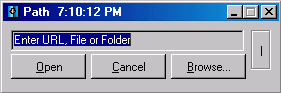
| Replace your Run menu with a more useful one. Path is the latest re-invention of Windows Run menu, plus several extra commands missing from it, such as desktop, start menu and user-defined tools. This application uses very little system resources and minimizes to the system tray. Replace the standard Windows "Run" menu, with a more efficient one. Access all areas of your system conveniently. | ||
 Screenshot Screenshot |
||
| Solway's Task Scheduler |
260 kB |
95/98/ME/NT4/2000/XP |
| Solway's Task Scheduler is a small program which enables you to start other programs automatically, or play (say) music files, or run batch files, periodically and at pre-defined times. This program functions very well in combination with backup software, disk fragmenters, virus scanners and other regularly scheduled system maintanance utilities. | ||
| Micro-Sys Launcher |
829 kB |
95/98/ME/NT/2000/XP/2003 |
| Launcher is an easy-to-use personal shortcut manager to launch all kinds of files and programs. Drag-and-drop operations are supported; this means that when Launcher is in 'Manage Items' mode, it is possible to configure shortcuts by 'dragging' files from e.g. Windows Desktop and then 'dropping' them into Launcher. One can create an unlimited amount of user defined sub-folders and item (e.g. program) shortcuts. Launcher always resides in the system tray per default; however, one can turn this off in settings. Launcher also has various GUI options, e.g. customizable program font setup (name and size). | ||
 Utilities
Antivirus
Backup
» DVD backup
Clipboard
Desktop Enhancements
File & Disk Management
» Cleanup Tools
» Data Recovery
» Disk Tools
» File Managers
» File Renaming
» File Searching
» File Splitting
» Misc. Utilities
File Compression
Firewall
Launchers
Network
Optimizers & Diagnostics
Printers
Registry
Security & Encryption
System Utilities
Text Editors & Tools
Uninstallers
© The Network